Open a backup without handing it over.
A local macOS reader for personal-data exports. Old conversations, notes, and photos, readable on your own Mac.
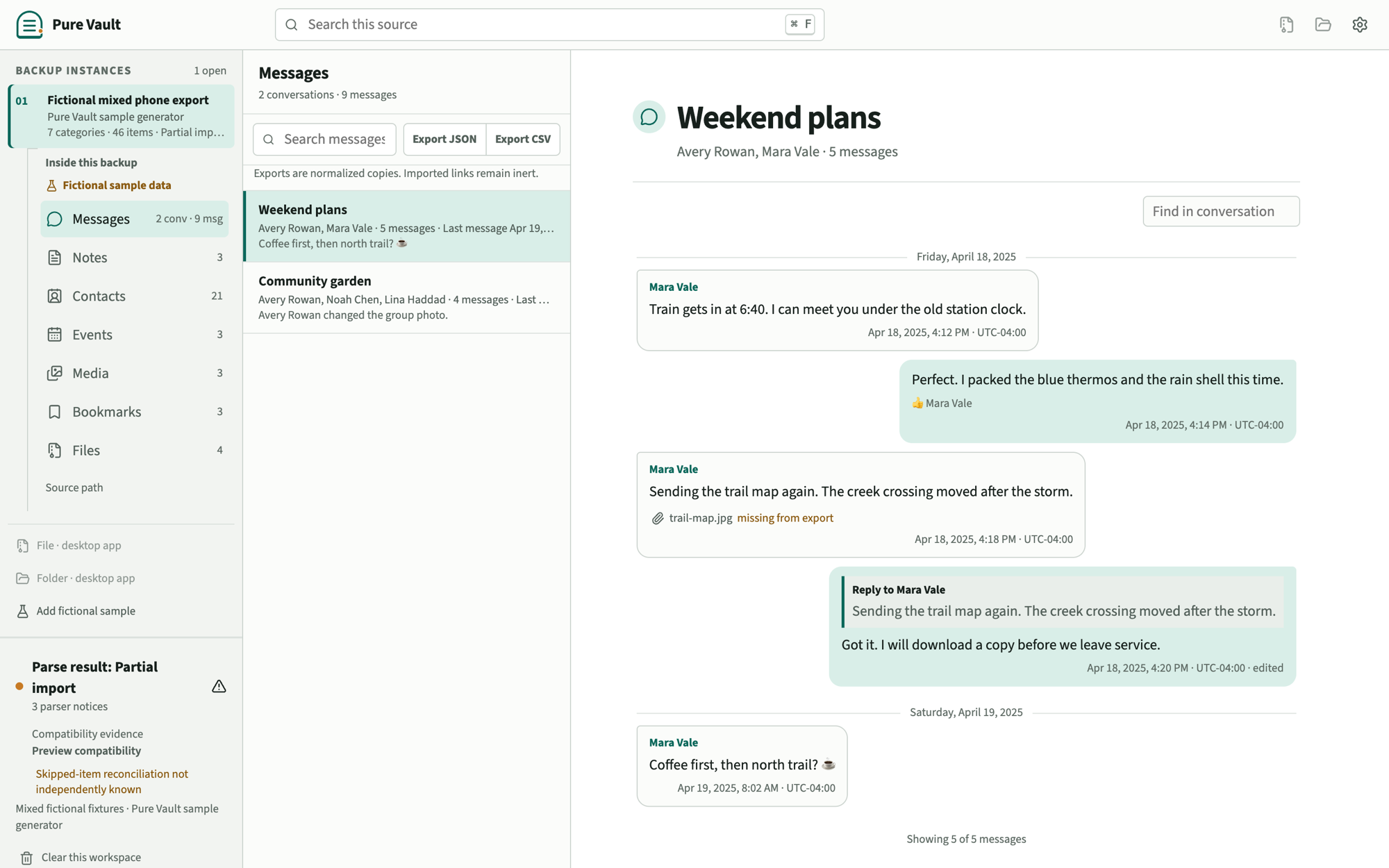
Point it at the export you already have.
A file, a folder, or a ZIP. Formats are recognized from their contents, not their filenames, and one selection can produce several readable categories.
Messages are the flagship
Six sources, one conversation viewer you can dress as WhatsApp, iMessage, Messenger, SMS, Telegram, Signal, or Pure Vault. The choice sticks to that backup.
- Telegram Desktop
- result.json, its folder, or the export ZIP
- Facebook Messenger
- the export folder, message_N.json, or export ZIP
- Instagram DMs
- the same Meta thread shape, wherever the folder names moved
- Android SMS and MMS
- SMS Backup & Restore XML, alone or in its folder
- an exported chat transcript or its ZIP
- Apple Messages
- a copied chat.db or selected Messages folder, experimental
Notes
Markdown, plain text, HTML, Google Keep JSON, and Evernote ENEX.
Contacts
vCard, plus known Google Contacts and Outlook CSV shapes.
Calendars
ICS events and tasks, shown without inventing an infinite series.
Media
Local photo, video, and audio folders. Folders act as albums.
Bookmarks
Netscape bookmark HTML. Every address stays inert, copy-only text.
Files
Bounded previews for JSON, CSV, YAML, TOML, INI, and logs.
The full matrix, each adapter's limits, and every measured safety boundary live on the compatibility page.
Conversations that look like the app they came from.
Inspired-by views for WhatsApp, iMessage, Messenger, SMS, Telegram, and Signal, plus Pure Vault. The choice sticks to that backup. These are not clones.
WhatsApp view
iMessage view
Telegram view
Illustration of inspired-by conversation views, drawn in this page's CSS. Not a screenshot of a real archive. Names like Mara and Avery are fictional.
Reading, not restoring.
Each opened backup becomes its own workspace in process memory. Several can be open side by side without mixing sources.
-
Choose a file or folder
Native pickers are the only way to authorize a path. Selecting one file does not expose its siblings.
-
See what was detected
The recognized shape, item counts, warnings, and evidence tier are visible before you settle in to read.
-
Read in familiar viewers
Conversations, notes, contacts, events, albums, bookmarks, and files share one calm shell.
-
Search what is open
Search is local to the open workspace and is forgotten with it. Queries are never stored.
-
Export or clear, explicitly
Export writes a normalized JSON or CSV copy to a new file you choose. Clearing a workspace only forgets memory; the source is untouched either way. An optional app password can lock the window on this computer.
It tells you how sure it is.
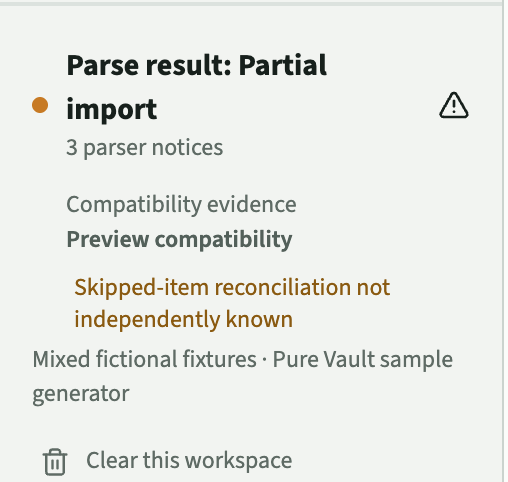
Compatibility evidence is a first-class feature here, not fine print. Every import names its adapter, its evidence tier, and what remains unknown.
Nobody has earned this yet
Reserved for adapters proven against an independently sourced corpus with exact record reconciliation, malformed and partial coverage, and native-platform proof. No adapter carries the label today, and it will not be handed out early.
Implemented, exercised on fictional fixtures
The documented shape is implemented and tested against fictional repository fixtures. Most portable formats sit here today. Vendor drift and real-export coverage remain open evidence.
Private schemas, drift expected
Formats that are private or undocumented enough that breakage is expected. Apple Messages chat.db is the current example: readable, useful, and labeled with appropriate suspicion.
Parse health is a separate axis
Complete, partial, unsupported, or failed describes one parse attempt. A clean parse never upgrades an adapter's evidence tier.
And when an export does not say how much it skipped, Pure Vault reports the reconciliation as unknown. It is never assumed to be zero.
Nothing leaves the process.
No account, no telemetry, no archive library, no background network service. The trust boundary is documented behavior, not a slogan.
Read-only by construction
Sources are opened read-only. ZIPs are validated and read in place, never extracted to disk, and directory access cannot escape the selected root.
Memory-only workspaces
Imported content and source paths live in process memory. Clear a workspace or quit and they are gone. What survives is your display preferences, an optional conversation-view choice stored as a path hash, and, only if you switch it on, a short list of where past backups live: pointers and detection details, never content.
The interface sees pages, not your disk
The UI receives metadata and normalized pages, never arbitrary filesystem access. Media previews use opaque, process-local URLs confined to the selected root.
Imported content stays inert
HTML and Markdown from a backup cannot run scripts or load remote media. Bookmark addresses are copy-only text the app never opens on its own.
No calls home
No update ping, no CDN, no runtime-loaded font. Source Sans 3 ships inside the application, and the content security policy allows packaged resources only.
Exports are deliberate
Writing a normalized copy requires a native save dialog, targets a brand-new file, and can never overwrite a source or land inside one.
The repository documents the full model in its architecture and security policies. The short version for this site is on the privacy page.
What it will not do, on purpose.
Pure Vault refuses clearly instead of parsing badly. These are product decisions, not roadmap gaps.
- Encrypted device backups. Not opened, not brute-forced.
- Signal backups. Encrypted by design, and left that way.
- Encrypted WhatsApp databases. crypt-format files are refused by name.
- Time Machine volumes and disk images. Out of scope entirely.
- Restoring to a device. This is a reader, not a migration tool.
- Deleted-data recovery. No forensics, no undelete promises.
- Anything needing a password or login. Vaults and live cloud accounts stay unsupported.
- Fetching remote attachments. If it is not in your export, it is not fetched.
Get Pure Vault.
Pure Vault is a paid macOS app for macOS 12 Monterey or newer. Official macOS packages are a one-time purchase. No signed, notarized public installer has been published. The universal candidate contains Apple silicon and Intel builds; runtime verification has been completed on Apple silicon.
See the buy page for the lifetime license, or email contact@purevault.app. See the buy page for current checkout availability. Do not send card numbers by email. Source access is private.
The empty state includes a fully fictional sample, so you can inspect every viewer without selecting personal data. Pure Vault never checks a network for updates; replace the app with a newer package yourself.
Questions, answered plainly.
Is it really offline?
Yes. There is no account, telemetry, update ping, CDN asset, or runtime-loaded font, and the app never fetches URLs found inside a backup. A no-open-socket check is part of the recorded macOS verification.
Is it free?
No. Pure Vault is a paid desktop app. One payment covers a lifetime license for official macOS packages, including later macOS builds while the project publishes them. There is no subscription and no in-app account. Source access is private. The lifetime license for macOS is $29.99 USD, with any applicable tax shown at checkout.
Can I use my purchase on another Mac?
Yes. Your personal license covers your use on Macs you own or control. Use the private link in your purchase email to download again. There is no in-app account, device activation, or online license check. The license does not cover redistribution to other people; keep the installer and download link private.
Can I trust an import to be complete?
Only as far as the evidence says, and the app says so itself. Every import shows its compatibility tier separately from its parse health, and a skipped-item count the export does not reveal is shown as unknown, never assumed to be zero. Keep your originals; Pure Vault reads them without changing them.
Which platforms work today?
This release is macOS-only and targets macOS 12 Monterey or newer. The universal candidate contains Apple silicon and Intel builds; runtime checks were completed on Apple silicon, not Intel. No signed, notarized public installer has been published. Only macOS downloads are currently available.
Can it open Signal, encrypted WhatsApp, or an encrypted iPhone backup?
No, deliberately. Encrypted device backups, Signal backups, encrypted WhatsApp databases, Time Machine volumes, restoration, and deleted-data recovery are outside the product's purpose. It refuses clearly instead of guessing.
Where does my data go when I quit?
Imported content and search queries live only in process memory and are released when workspaces are cleared or the app exits. Source paths follow the same rule unless you switch on the off-by-default Remember opened backups list, which stores locations and detection details (never content) and is deleted when turned off. That is a process-level promise, not cryptographic memory erasure: the operating system may retain bytes in allocator pages, swap, or crash artifacts.
How do I get the app?
Buy a one-time license on the buy page, or email contact@purevault.app with the subject Pure Vault license. No signed, notarized public installer has been published. Unsigned packages are not a substitute for a notarized build. See the buy page for current checkout availability.
What are conversation views?
Message threads can use an inspired-by conversation view: WhatsApp, iMessage, Messenger, SMS, Telegram, Signal, or Pure Vault. The choice is stored per backup as a hash of the path, not as a copy of the path. These are inspired-by skins, not clones of those apps.
How do I update?
Pure Vault never checks a network for updates. Download a newer official package, then replace the app. Your original exports are not inside the app.
How do I uninstall?
Quit Pure Vault, delete the application, then delete the PureVault folder in your OS user config directory if you also want the remembered-backup list and app password gone. Clearing a workspace never deletes your original exports.
Is the name final?
No. Pure Vault is a working name and has not been trademark-cleared.